

Table of Contents
- Best Budget Microphones for Streaming: Quick Comparison
- The Best USB Microphone for Streaming Under $150
- USB vs. XLR Microphone for Streaming: Which Should You Choose?
- Microphone Polar Patterns for Streaming: Cardioid vs Omnidirectional
- How to Reduce Background Noise on a Microphone
- Budget Microphone Kits and Accessories for Streaming
- Conclusion
- Frequently Asked Questions
Last Updated: October 8, 2026
Best Budget Microphones for Streaming: Quick Comparison
Finding the best budget microphones for streaming no longer means settling for tinny audio.
The biggest mistake new streamers make is buying on price alone.
| Microphone | Price | Connection | Pickup Pattern | Best For |
|---|---|---|---|---|
| Wired Recording Live Stream Microphone | $44.42 | Wired | Not specified | Tightest budgets |
| RGB Lamp Condenser Microphone | $45.96 | Wired | Not specified | RGB desk aesthetics |
| Household RGB Noise-canceling Desktop Mic | $47.47 | USB | Not specified | One-key noise cancellation |
| Computer Microphone | $64.93 | Wired | Not specified | Compact desktop use |
| Microphone Computer Game Voice Condenser | $68.94 | Wireless | Super-cardioid | Gaming and voice chat |
| Desktop Microphone Live Conference | $80.36 | USB | Omnidirectional | Conference and streaming |
| EG 85 EGWAT Moving Coil Microphone | $81.98 | XLR-style | Not specified | Boom-arm setups |
| Mobile Phone Voice Game Microphone (X2) | $110.78 | Wired | Cardioid | Vocals and karaoke |
| NW70 Microphone Kit | $120.69 | XLR | Cardioid | Complete starter kit |
| Capacitor Microphone USB (PM422) | $140.81 | USB | Cardioid | Highest-fidelity USB pick |
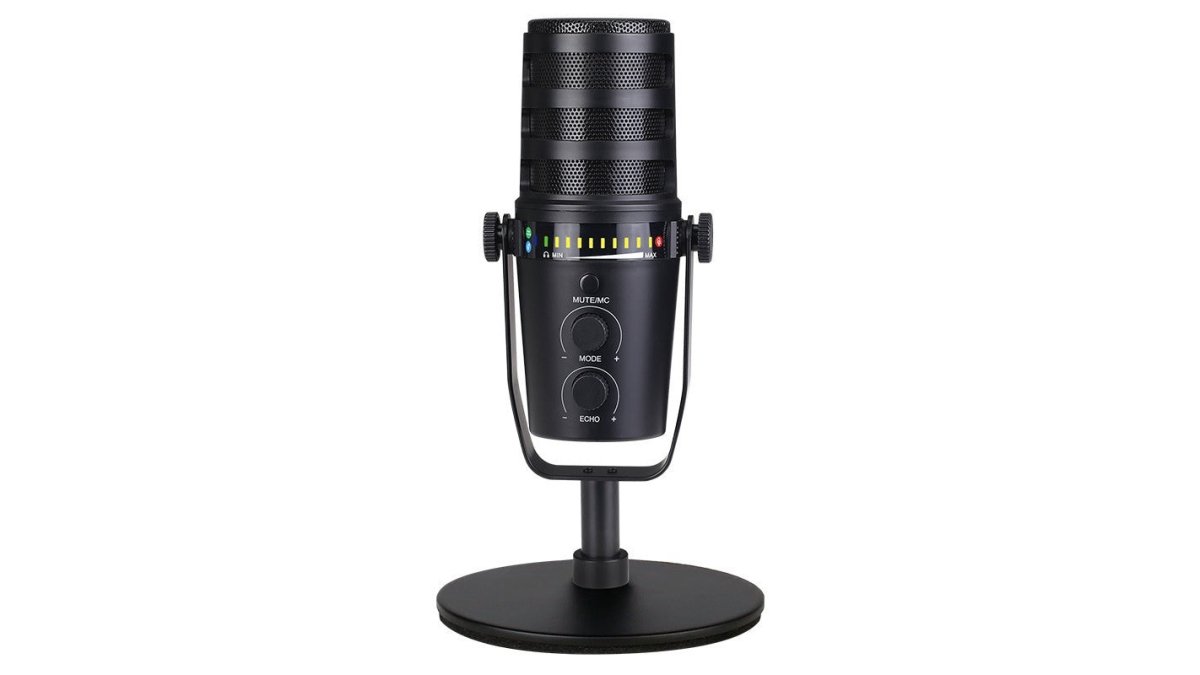
The Best USB Microphone for Streaming Under $150
Bit depth and sample rate matter less than your room. A 24-bit/192kHz mic in a bare, echoey room sounds worse than a 16-bit mic surrounded by soft furnishings. Buy the PM422 if your space is already reasonably quiet.

The packing list is unusually complete: shockproof frame, windproof cotton, fixing clip, blowout preventer net, cantilever frame, USB cable, and the microphone itself, no separate boom arm purchase on day one.
Its 74dB signal-to-noise ratio is the standout spec.
- Check your room for hard, reflective surfaces before buying
- Confirm your PC has a free USB port and enough power output
- Budget for a pop filter if you speak close to the mic
Household RGB Noise-canceling Desktop Microphone
The Household RGB Noise-canceling Desktop Microphone at $47.47 is our pick for streamers who want clean audio with minimal setup.
It covers a 20Hz-20kHz frequency response and comes in five versions: HK2 Black (noise cancellation plus RGB), K8 USB Black, K6 USB Black/Blue, K6 PLUS USB Black with RGB, and a K6 3.5mm standard version.
The honest limitation: a single-button noise canceller tames steady hum but will not remove a dog barking mid-sentence.
USB vs. XLR Microphone for Streaming: Which Should You Choose?
USB microphones suit most streamers because they plug directly into a computer with no interface, preamp, or extra cables. XLR microphones deliver better long-term audio quality, but only with an audio interface and phantom power.
Here is the practical trade-off:
- USB: Plug-and-play, one cable, works instantly with streaming software. Best for solo streamers and beginners.
- XLR: Requires an audio interface, delivers cleaner signal at higher volumes, and lets you upgrade the mic without replacing the whole chain. Best for podcasters and multi-mic setups.
The Total Setup Cost Nobody Quotes You
A bare XLR microphone is never the full price. You also need an audio interface with a preamp, an XLR cable, phantom power (usually 48V) for a condenser, plus a boom arm or stand and pop filter.
A USB microphone collapses that chain into one purchase. Our PM422 at $140.81 ships with a shockproof frame, windproof cotton, fixing clip, blowout preventer net, cantilever frame, and USB cable, a complete desk setup out of the box.
Compatibility: The Part That Breaks Beginner Setups
Compatibility is where budget gear quietly fails. Confirm three things before ordering:
- Operating system. The NW70 Kit and EG 85 are XLR-style options, and the NW70 will not work with Mac, mobile phones, or tablets, so it is ruled out for Mac streamers.
- Power delivery. The NW70 needs a device supplying 5V. If your laptop or mixer cannot deliver enough power, you need a separate 48V phantom power adapter. Underpowered laptops produce low, quiet recordings, not an error message, so it is easy to misdiagnose as a faulty mic.
- Streaming software. USB mics appear as an input device in OBS, Streamlabs, and most capture software with no driver install. XLR mics appear only after the interface is connected and recognized, and some interfaces need a driver first.
Basic Configuration Steps for Either Format
Once the mic is connected, the setup routine is the same regardless of format:
- In your streaming software, add an Audio Input Capture source and select the microphone or interface by name.
- Set input gain so normal speech peaks around -12 dB to -6 dB, never touching 0 dB.
- Disable the OS's automatic gain control and built-in "enhancements" so the software receives a clean signal.
A Simple Decision Rule
Choose USB if you stream solo, want one cable, and do not plan to add a second microphone within a year. Choose XLR if you already own an interface, plan to run multiple mics, or want to upgrade the mic later without replacing the chain. If unsure, start USB, you can move to XLR once you know your room and voice.
Microphone Polar Patterns for Streaming: Cardioid vs Omnidirectional
A polar pattern describes which directions a microphone hears. Cardioid patterns pick up from the front and reject the sides and rear, suiting solo streamers. Omnidirectional patterns hear equally in all directions, suiting group recordings and conference tables.
How Each Pattern Behaves in a Real Streaming Room
Cardioid is the default for solo streaming because it rejects the sides and rear. Point the front at your mouth and the pattern ignores your PC fan and the wall behind the mic.
Super-cardioid is a tighter cardioid with a narrower pickup angle and slightly more rear sensitivity.
Omnidirectional hears equally in all directions. The Desktop Microphone Live Conference Microphone at $80.36 uses a full-direction pattern, right for two or three people around one desk.
Household RGB Noise-canceling Desktop Microphone →

Matching the Pattern to Your Actual Problem
Most streamers do not have a microphone problem, they have a room problem, and the polar pattern is the first tool for solving it.
- Mechanical keyboard clatter: Use cardioid or super-cardioid and position the mic so the keyboard sits off-axis, outside the pickup lobe. Angling the mic toward your mouth and away from the keyboard beats any software filter.
- Shared room or open-plan space: Cardioid plus a close mic position. The further the mic sits from your mouth, the more of the room it hears relative to your voice.
- Two or three people at one desk: Omnidirectional, placed centrally, with everyone at roughly equal distance. A single cardioid mic makes the off-axis person sound distant and thin.
Placement and Gain by Pattern
Pattern choice only pays off if placement supports it. Streamers who get clean audio from budget gear keep the mic roughly a hand's width from the mouth, angle it slightly off-axis so plosives miss the capsule, and lower input gain until normal speech peaks around -12 dB to -6 dB.
For a group stream with an omnidirectional mic, place it at the center of the table and resist cranking the gain, raising gain amplifies the whole room, not just the people talking.
- Cardioid: Solo streaming, vocals, single-person recording
- Super-cardioid: Gaming voice chat, noisy keyboards
- Omnidirectional: Panel streams, co-op sessions, conference calls
Shure's guide to microphone polar patterns
How to Reduce Background Noise on a Microphone
Reducing background noise on a microphone comes down to three levers: mic placement, gain control, and physical room treatment.
Start with placement: move the microphone closer to your mouth and lower the gain.
Next, address the room. Hard floors, bare walls, and glass bounce sound back into the mic; soft furnishings, a rug, curtains, and a bookshelf absorb it.
Then use the hardware you already have. The Household RGB mic's one-key noise cancellation and the Desktop Live Conference mic's DSP dynamic noise reduction both handle steady background hum at the source.
- Lower the gain, raise the mic
- Add soft surfaces before buying acoustic foam
- Use hardware noise cancellation for steady hum, not sudden sounds
Shure's guide to microphone polar patterns
Budget Microphone Kits and Accessories for Streaming
A microphone kit bundles the accessories a bare mic leaves out: boom arm, shock mount, pop filter, and cable. Buying them together usually costs less than buying each piece separately.

NW70 Microphone Kit with Boom Arm and Pop Filter
The scissor arm is steel, double-braced, and extends to roughly 80cm with a maximum load of about 1kg, enough reach to position the mic above your desk without sagging mid-stream.
The NW-700 uses a cardioid pickup pattern and a gold-sputtered diaphragm for accurate sound reproduction.
Two caveats before you buy: it cannot work with Mac, mobile phones, or tablets, and the documentation recommends adding a sound card for better sound. Both affect total cost.
| Kit Component | Included | Purpose |
|---|---|---|
| NW-700 condenser mic | Yes | Core audio capture |
| Scissor arm stand | Yes | Positioning above desk |
| Shock mount | Yes | Reduces handling noise |
| Pop filter | Yes | Removes plosive pops |
| Foam cap | Yes | Wind and spit protection |
| XLR cable | Yes | Connection to interface |
Conclusion
Matching a microphone to your room and voice matters more than chasing the highest price tag. A quiet space, a cardioid pattern, and sensible gain control outperform an expensive mic in a bad setup every time.
MIIGRE stocks the full range covered here, from the $44.42 Wired Recording Live Stream Microphone up to the $140.81 PM422, with free worldwide shipping on every order.
Frequently Asked Questions
What type of mic is best for streaming on a budget?
A USB condenser microphone with a cardioid polar pattern is the best budget choice for streaming. USB mics like the MIIGRE Household RGB Noise-canceling Desktop Microphone plug directly into your computer without an audio interface, keeping total costs low. Cardioid patterns reject room noise and keyboard clicks, which matters in untreated rooms. Look for models with a frequency response of at least 20Hz-20kHz for clear voice reproduction.
Are USB or XLR microphones better for streaming?
USB microphones are better for most budget streamers because they are plug-and-play and require no extra equipment. XLR microphones offer upgrade paths and lower noise floors, but they need an audio interface and cables, which adds cost. The MIIGRE NW70 Microphone Kit includes an XLR condenser mic with a boom arm, pop filter, and shock mount, but it still requires a 48V phantom power supply or sound card for best results.
How can I reduce background noise on a budget microphone?
Start by selecting a cardioid pattern microphone, which picks up sound from the front and rejects noise from the sides and rear. Place the mic 15-20cm from your mouth and lower the gain. Use a one-key noise cancellation feature if available, like on the MIIGRE Household RGB Noise-canceling Desktop Microphone. Software noise gates in OBS or Streamlabs also help. Adding soft furnishings, rugs, or curtains to your room reduces echo and keyboard noise.
How much should I spend on a streaming microphone?
You can get clear streaming audio for under $150. The MIIGRE RGB Lamp Condenser Microphone starts at $45.96, and the Household RGB Noise-canceling Desktop Microphone is $47.47. For a complete kit with a boom arm and pop filter, the NW70 Microphone Kit is $120.69. Spending more than $150 is only necessary if you need XLR connectivity, advanced mixing, or studio-grade recording for music production.
Do I need a boom arm or pop filter for streaming?
A boom arm and pop filter improve audio quality by positioning the mic closer to your mouth and reducing plosive sounds like 'p' and 'b'. They are not strictly required, but they help significantly in untreated rooms. The MIIGRE NW70 Microphone Kit includes both, plus a shock mount and foam cap, so you get a complete setup in one purchase. If you buy a standalone mic, add a boom arm and pop filter separately for the best results.